How Long Does It Take to Build a Website?
One of the most common questions asked during an initial project consultation is: how long will this actually take? The answer depends on several variables — but understanding them upfront prevents the frustration of misaligned expectations on both sides.
This guide outlines realistic timelines for the most common types of website builds, and explains the factors that most often cause projects to run longer than planned.
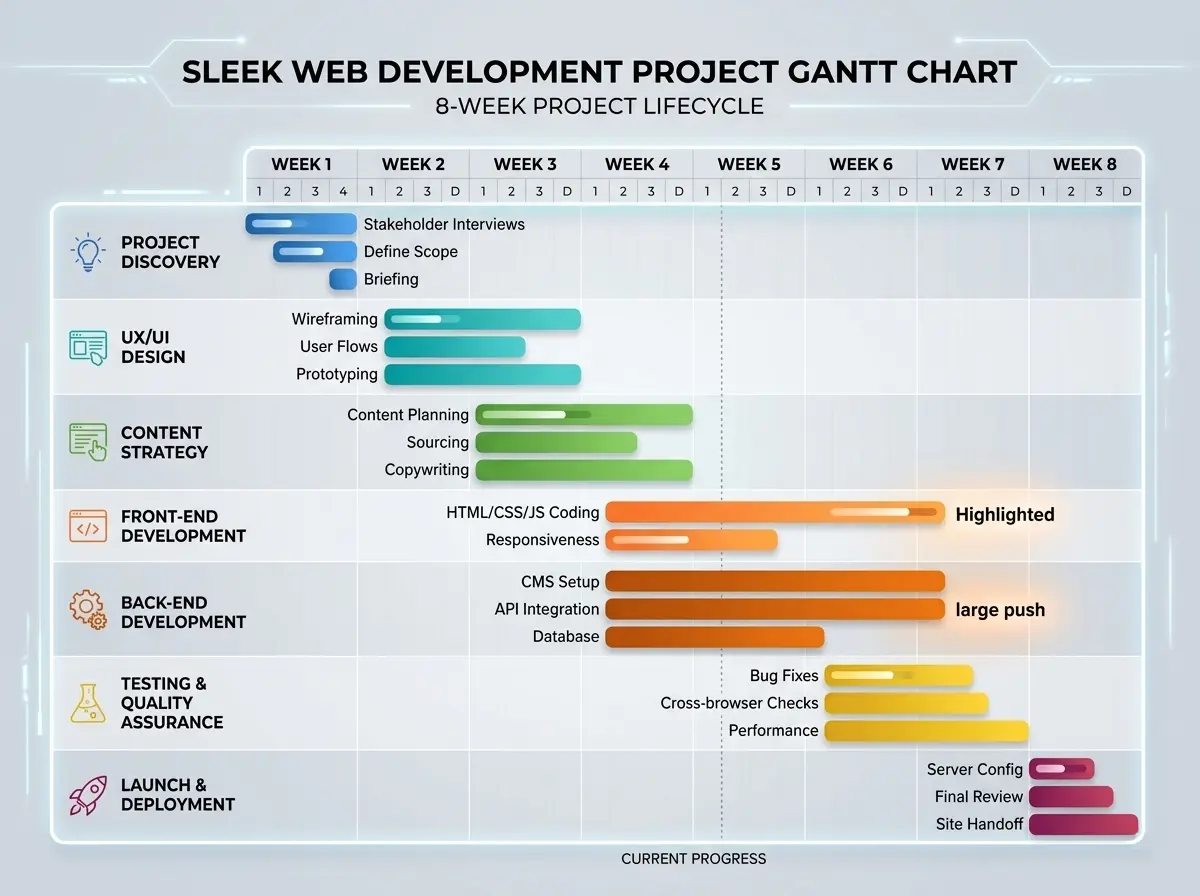
Typical Timelines by Project Type
As a working benchmark for professionally delivered websites in 2026:
- Brochure site (4–6 pages): 3 – 5 weeks
- WordPress site with blog and CMS: 4 – 7 weeks
- Shopify or WooCommerce e-commerce store: 6 – 12 weeks
- Custom-coded high-performance build: 8 – 16 weeks
These timelines assume a reasonably complete brief at the outset and prompt client feedback at review stages. Either of those conditions failing is the most common reason a project exceeds its original schedule.
The Phases of a Website Project
Every professional web build follows a broadly similar sequence:
-
Discovery and planning (1–2 weeks) covers requirements gathering, sitemap definition, and content strategy. The clearer the brief at this stage, the smoother every phase that follows.
-
Design and prototyping (1–3 weeks) produces wireframes and visual designs for client approval before development begins. Changes at this stage are far less costly than changes after development.
-
Development (2–8 weeks depending on scope) is where the actual build happens — frontend, CMS configuration, integrations, and performance optimisation.
-
Content population and testing (1–2 weeks) involves loading final copy and imagery, cross-browser and device testing, and pre-launch performance and accessibility audits.
-
Launch and handover (3–5 days) covers final deployment, DNS configuration, Search Console setup, and client training.

What Causes Projects to Run Over
The most consistent causes of timeline overruns are:
-
Content delays. Copy and imagery are almost always the critical path. A developer cannot finalise a page without its content, and waiting on text or photos is the single most common reason builds stall.
-
Scope creep. Additions requested mid-project — a new section, a booking integration, an additional language — each add time. Defining scope comprehensively at the outset avoids this.
-
Slow feedback cycles. A review stage with a two-week response turnaround doubles its allocated time. Agreeing response SLAs at project kickoff keeps things moving.
-
Third-party dependencies. Payment gateway approvals, domain transfers, or content migrations from legacy systems can add weeks if not anticipated in advance.
How to Keep Your Project on Track
Arrive at your first meeting with a content plan, not just an idea. Know roughly how many pages you need, what sections each page requires, and who is responsible for producing the copy and images. Developers can assist with content strategy, but the content itself must come from the client.
Reviewing the website development process before kickoff helps set accurate expectations. For context on how completed projects are structured and delivered, the portfolio provides examples across a range of categories and scales.
Once ready, starting your project with a clear brief is the most reliable way to ensure the timeline you are quoted is the timeline you experience.
A well-managed website project does not run over because of technical complexity — it runs over because of content and communication. Prepare both before you begin, and the build will follow the plan.